DocsConcepts
Project files
The plugin lives in your tool and puts no files in your project. Your project gets its files from the ab-project-start skill: an AGENTS.md that every tool reads, and a docs/ tree where plans, decisions and solved problems stay from one session to the next. Run it first thing in a new project, or when you add the blueprint to one that exists; it merges into your files and never overwrites them. Set up your project shows how to call it in each tool.
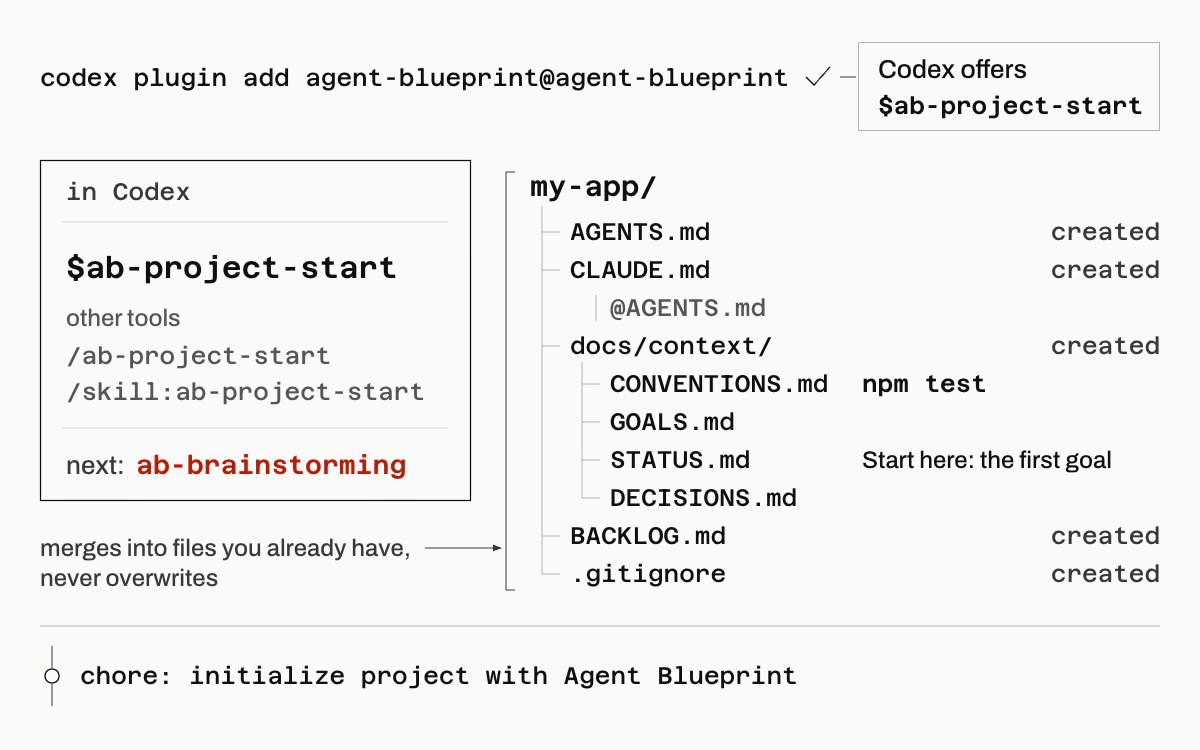
ab-project-start sets up a projectWhat you get
Project structure
Plugin (installed in your tool, zero files in your project)
├── 53 skills            skills/<name>/SKILL.md with references/ (prompt files, procedures) and optional scripts/ and assets/
│                        ab-build-pipeline, ab-ship-pipeline, ab-brainstorming, ab-review-swarm, ab-orchestrate, ab-migrate, ...
├── 30 helper prompts    skills/<skill>/references/agents/<name>.md: a helper runs it where the tool has subagents, the session follows it where not
└── 10 hooks             hooks/claude-code.json (session-start, prompt-guard, validate-commit, sdd-cache pre and post, context-monitor,
                         read-injection-scanner, ship-loop, task-completed, teammate-idle) and hooks/codex.json (five of them)

your-project/ (scaffolded by ab-project-start)
├── AGENTS.md              # Project instructions; every tool reads it
├── CLAUDE.md              # One line, @AGENTS.md, so Claude Code loads the same file
├── BACKLOG.md             # Idea and bug capture inbox
├── blueprint.local.md     # Per-developer helper configuration (gitignored)
├── .agent-blueprint/      # The blueprint's working files; run/ and team/ are ignored, plans and notes are tracked
├── docs/
│   ├── context/           # STATUS.md (session continuity), GOALS.md, CONVENTIONS.md, DECISIONS.md
│   ├── plans/             # Implementation plans
│   ├── specs/             # Feature specifications
│   ├── decisions/         # Architecture decision records
│   ├── research/          # Spike results and evaluations
│   ├── learnings/         # LEARNINGS.md: patterns and gotchas learned here
│   └── solutions/         # Solved problems, written by ab-knowledge-compounding
├── src/                   # Your application code
├── tests/                 # Your test suite
└── infra/                 # Deployment and infrastructure
Run ab-project-start first thing in a new project, or when you add the blueprint to one that exists. It merges into the files you already have and never overwrites them. It refuses your home folder, asks before writing into a folder with files that is not a git repository, and never runs git init inside a repository. Set up your project shows how to call it in each tool.
What each piece does
| Component | Purpose |
|---|---|
| AGENTS.md | The project instructions every tool loads: how work is done here and why, where things are, when to decide and when to ask. CLAUDE.md imports it for Claude Code. |
| Skills | Workflow steps that run at specific points: brainstorming, planning, test-driven development, debugging, review, team work, shipping, knowledge capture. Each is a folder with a SKILL.md under 8,000 bytes and its detail in references/. |
| Helper prompts | Prompt files for focused analysis (security, performance, architecture, research, plan checking) inside the skill that uses them. A helper runs one in its own context where the tool has subagents; otherwise the session follows the file itself. Both return the same output. |
| Hooks | Optional guards for Claude Code and Codex: a session-start pointer to STATUS.md, injection scanners, a commit-message check, the ship-pipeline Stop guard, the Agent Teams gates. No pipeline depends on them. |
| docs/context/ | Living project state: goals, status with the Session Continuity notes, conventions, locked decisions. ab-session-wrap updates it every session. |
| docs/solutions/ | Solved problems written by ab-knowledge-compounding, searched by ab-brainstorming and ab-deep-research before new work. |
| .agent-blueprint/ | Working files: run state, the team ledger, review runs, debug notes, plans in progress. Its own .gitignore keeps run state out of commits. |
| BACKLOG.md | Quick-capture inbox for ideas, bugs and tasks, sorted by ab-backlog-triage into prioritized work. |
| blueprint.local.md | Each developer’s choice of which review and research helpers run for this stack. Gitignored. |
Documentation structure
The scaffold includes example docs in docs/, docs/, docs/ and docs/, so you can see the expected format right away. They are marked as examples; delete them when you start your project.
| Example file | Shows how to write |
|---|---|
docs/ |
Architecture decision records |
docs/ |
Implementation plans that record decisions |
docs/ |
Feature specifications with acceptance criteria |
docs/ |
Research docs with findings and recommendations |
The docs/ folder uses these categories, each with its own lifecycle:
| Folder | Contains | Lifecycle |
|---|---|---|
docs/ |
STATUS.md (with the Session Continuity notes), GOALS.md, CONVENTIONS.md, DECISIONS.md | Updated every session |
docs/ |
YYYY-MM-DD-topic.md implementation plans |
Created per feature, archived when done |
docs/ |
feature-name.md specifications |
Created before building, stable after approval |
docs/ |
NNN-kebab-case-title.md ADRs |
Created when choosing between options, permanent |
docs/ |
Spike results, tool evaluations | Created during exploration, referenced later |
docs/ |
LEARNINGS.md: patterns and gotchas | Appended by ab-session-wrap |
docs/ |
Solved problems | Created by ab-knowledge-compounding, searched by ab-brainstorming and ab-deep-research |