Guides
Unattended runs
The ship runner is a script inside ab-ship-pipeline, at skills/ in your checkout. It starts a fresh session for every iteration, and it pushes and opens the pull request only after its own secret scan. When a run ends without a pull request, ab-forensics reads the logs, run state and git history it left behind.
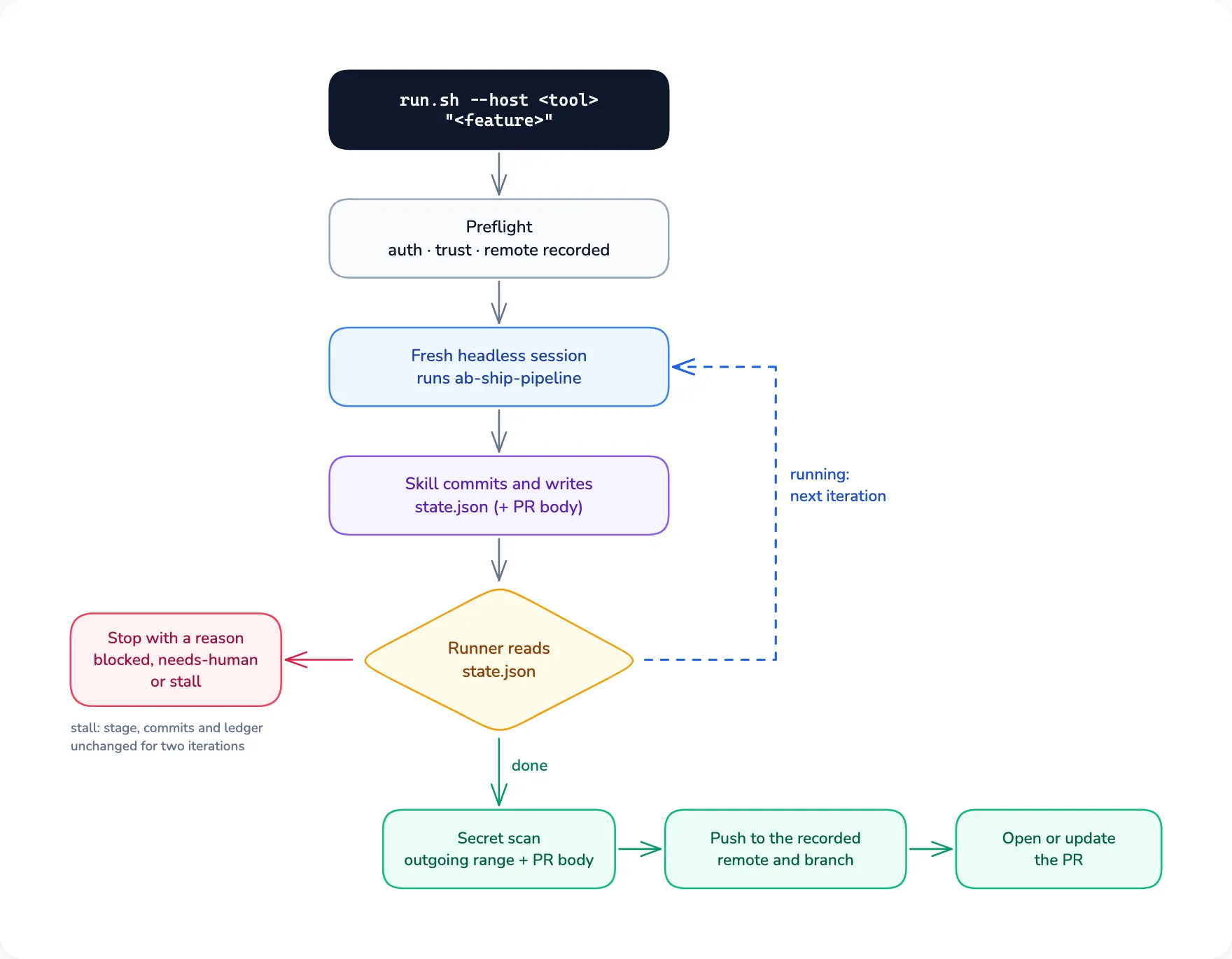
For a well-defined feature you want built hands-off, the ship runner drives ab-ship-pipeline through your tool’s headless mode. Inside a session you can also ask for the skill with the feature; the runner is for running it from a terminal, without you.
Start a run
-
Create a feature branch and make sure the working tree is clean. The runner refuses to run on the default branch, and needs git 2.29 or newer to work out what a push would publish.
git switch -c feat/jwt-refresh -
Start the runner with your tool and the feature.
--hostis one ofclaude,codex,agy,grok,pi,cursor-agent,hermes,amp; add--dry-runfirst to see the preflight and the command it would run without changing anything.bash <checkout>/skills/ab-ship-pipeline/scripts/run.sh --host codex "add JWT authentication with refresh tokens"The runner is
scripts/inside the installedrun.sh ab-ship-pipelineskill. Ask for that skill in a session and it prints the command with the installed path, or clone the repository and use the clone as<checkout>.
What the runner does
- Preflight. It checks that the tool is installed and signed in, records the remote and branch it will push to, and probes whether the tool’s headless posture can write to
.git. Where it cannot (Codexworkspace-write), the skill leaves its work uncommitted with the message in.agent-blueprint/, and the runner commits after each iteration.run/ commit-msg.md - The loop. Every iteration is a new headless session with a clean context. The skill locks the requirements as decisions, writes and verifies a plan, deepens it with research, builds it through
ab-orchestrate, reviews and fixes until no P1 finding is left (three rounds at most by default), records what it learned, commits, and writes the pull request body. Between iterations the runner reads.agent-blueprint/.run/ state.json - The finish check. Text the agent prints never ends a run. It is done only when the state file says
done, there are new commits since the recorded base, the pull request body exists, and the provenance record names the skill and its version. - Publishing. The runner scans every commit the push would publish (each one the remote does not have yet, plus the run’s own), their messages and the pull request body for secrets, including any
.envfile a commit added. Then it pushes exactly the commit it scanned, only to the remote and branch it recorded, and opens or updates the pull request. It stops asneeds-humaninstead if it cannot read the remote’s branches, if the git configuration (any file git reads,.git/included) or the place a push would go changed during the run, or if those commits touchconfig .github/orworkflows .github/and you did not passactions --allow-ci-changes. After it publishes, the runner deletes the run’s working files under.agent-blueprint/(run/ state.json,pr-body.md,commit-msg.md,stop-guard.jsonand theprovenance/folder) and its own record outside the working tree. It keeps the logs, so the pull request and the logs are the record of a published run.
When a run stops early
When the skill stops the run, it sets blocked or needs-human in .agent-blueprint/ and writes its reason there. When the runner stops it on one of its own checks (preflight, the stall rule, repeated tool errors, a publish check or the --max iteration limit), the runner prints the reason in the terminal and sets its exit code, and state.json may still say running or done. The stall rule ends a run as blocked when the stage, the commits and the team ledger stay unchanged for two iterations. The exit codes are 0 published, 1 usage or preflight, 2 blocked, 3 needs-human, 4 iteration limit and 130 interrupted.
For an unattended run, keep the runner’s output, for example by redirecting it to a file. The runner logs what the tool printed in each iteration under ${XDG_STATE_HOME:-~/, outside the working tree, but its own stop messages go only to the terminal. Fix the reported cause and continue with --resume. When that is not enough, the ab-forensics skill reads the run’s logs, state and git history.
How much each tool is allowed to do
Each tool runs with the least privilege that still finishes a run: Claude Code --permission-mode auto, Codex workspace-write with network on, Cursor CLI --force --sandbox enabled, Grok Build --always-approve --sandbox workspace. Pi, Amp and Antigravity can only run unguarded (--dangerously-skip-permissions or the equivalent), so the runner asks for --allow-unguarded before it starts one of them. On those tools the agent holds your git and gh credentials, and the runner’s publish checks cannot contain it.
Skills in this guide
- Pipelines
ab-ship-pipeline
Ships a feature end to end with no checkpoints, tracked in
.agent-blueprint/run/state.json; the ship runner drives it unattendedUse when: A well-defined feature you want built hands-off
- Operations
ab-forensics
Diagnoses a failed, stalled or aborted automated run after the fact from its logs, run state and git history
Use when: A ship run that did not finish
- Pipelines
ab-orchestrate
Runs a plan as team work: ledger, dependency-ordered waves, file ownership or worktrees, lead-only commits, review and sign-off
Use when: Four or more tasks, some independent