Guides
Team work and swarms
The blueprint runs several helpers at once in two ways. Team work splits a plan into waves of parallel tasks with ab-orchestrate, with your session as the lead and the only one that commits. A swarm gives several read-only helpers the same input, each with its own lens, and merges what they find, as ab-review-swarm and ab-deep-research do.
Helpers run one at a time or in coordinated groups. The same patterns work in every tool: a helper runs where the tool has subagents, and the session does the work itself where it does not.
Team work (ab-orchestrate)
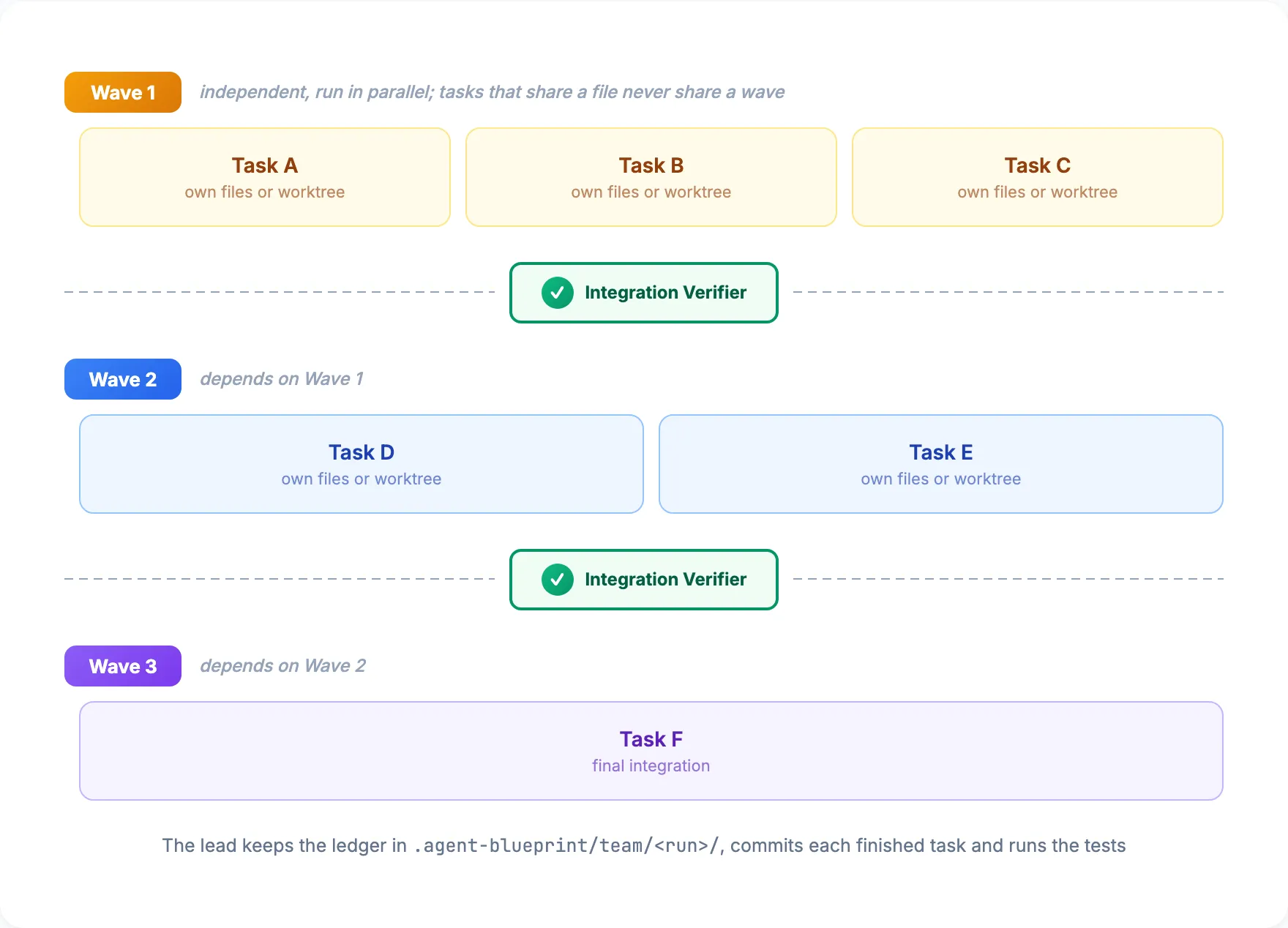
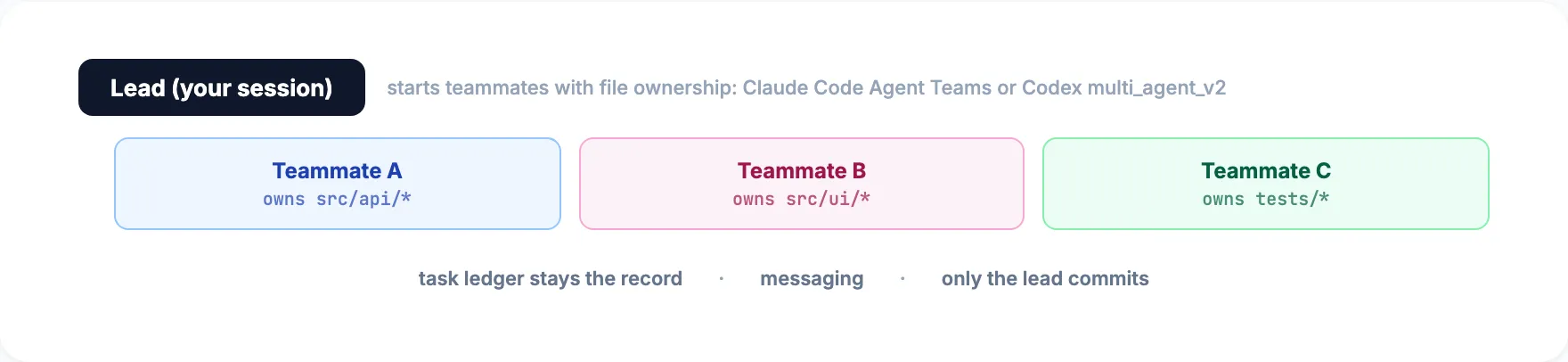
ab-orchestrate runs a plan as a team, with your session as the lead. The lead keeps a task ledger in .agent-blueprint/, groups the tasks into waves by dependency (tasks that share a file never share a wave), and starts one helper per task, each owning its files or working in its own worktree. Only the lead commits: it integrates each finished task, commits it, and runs an integration check between waves. A wave has four tasks by default and never more than the tool’s helper limit in skills/ (Claude Code 20, Codex 4, Pi 4 with pi-subagents, Hermes 3 interactive and 2 one-shot; Antigravity, Grok Build, Cursor CLI and Amp document no limit). A run can resume from the ledger in another session or another tool.
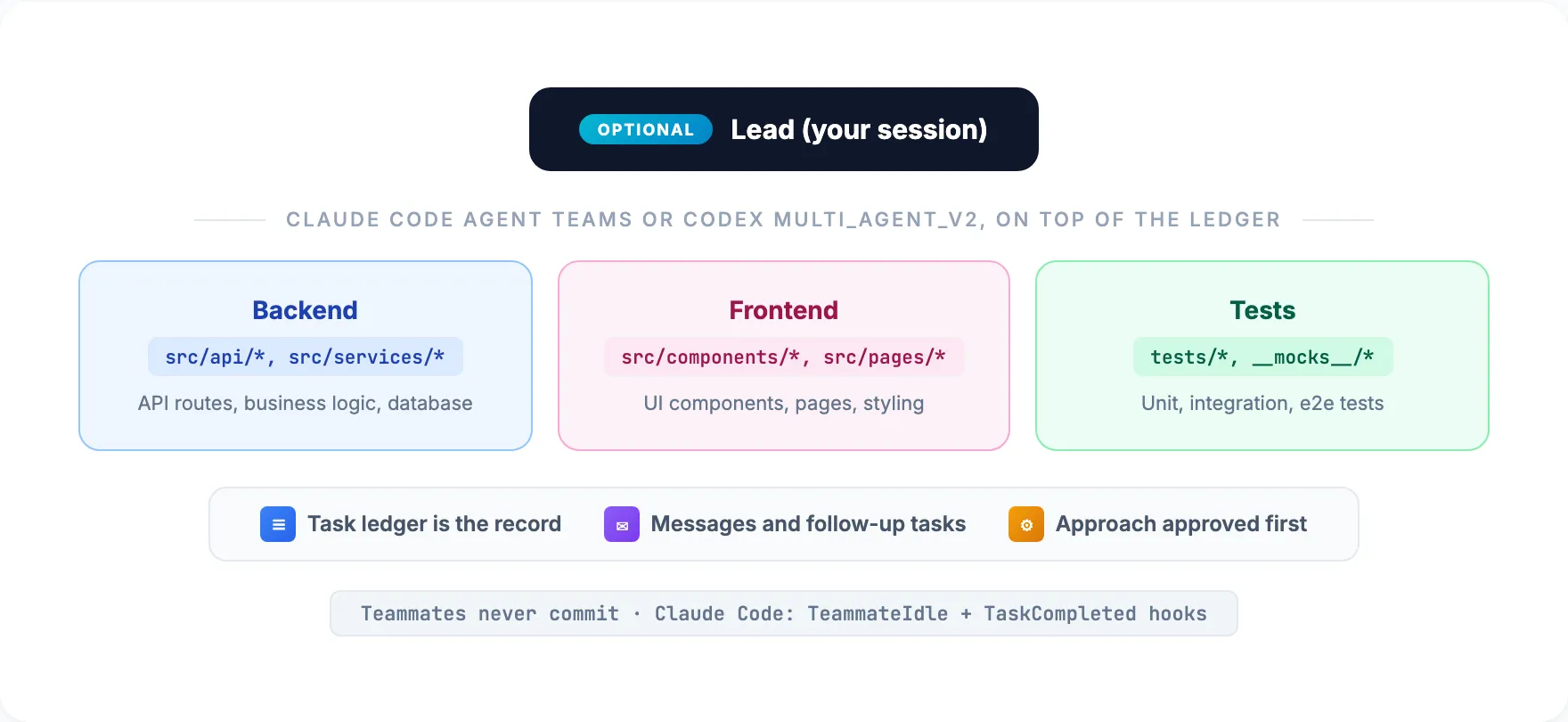
If you have switched on a native team feature, the lead uses it on top of the ledger, as skills/ describes: Claude Code Agent Teams (CLAUDE_, interactive sessions only, with the blueprint’s TeammateIdle and TaskCompleted hooks) and Codex multi_agent_v2 (multi_agent_v2 = true under [features], long-lived helpers that take follow-up tasks). The ledger stays the task list either way.
Review swarm (ab-review-swarm)
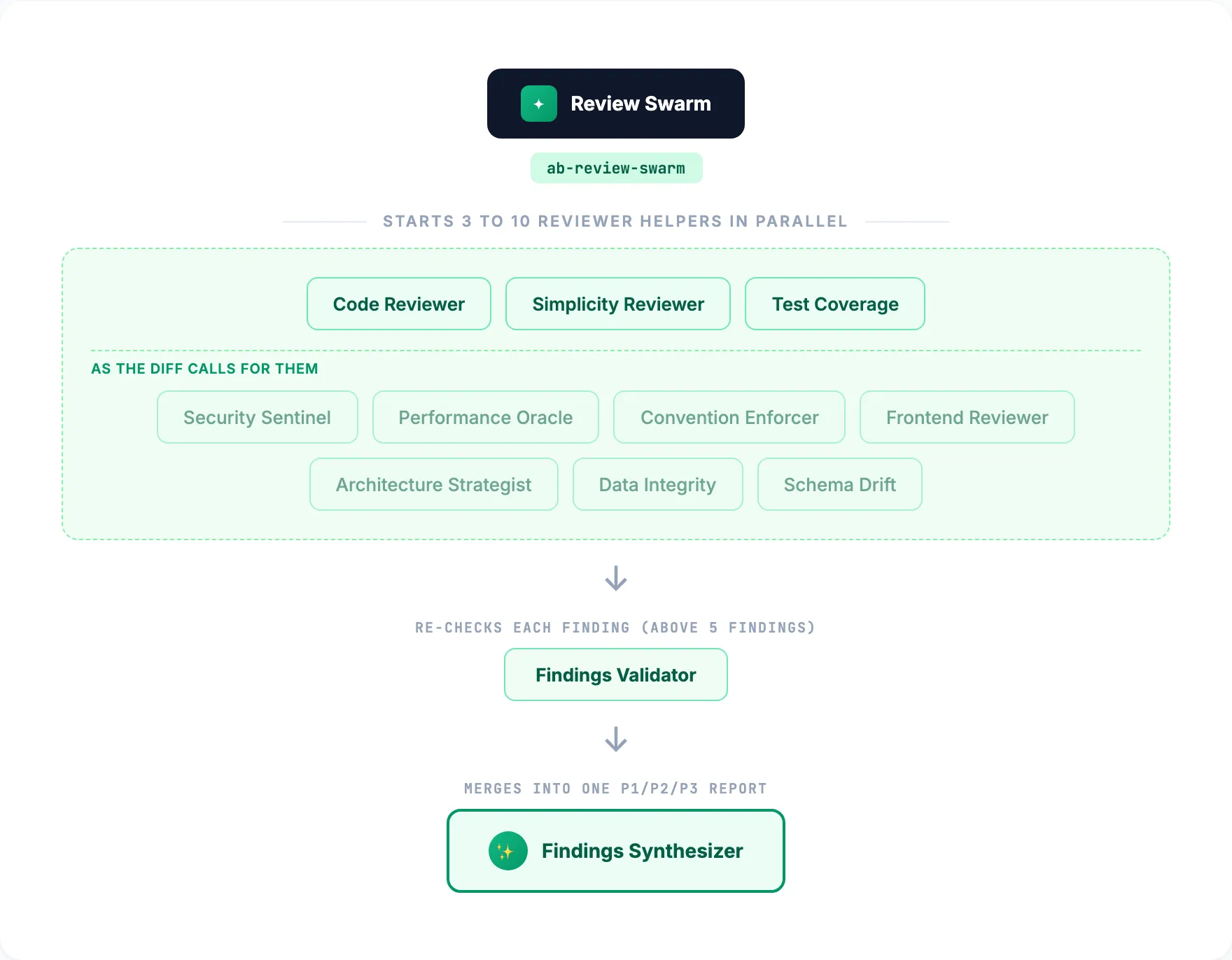
Reviews a change with specialized reviewers in parallel: quality, simplicity and tests every time; security, performance, conventions, frontend, architecture, data and schema when the diff calls for them. A validator re-checks the findings, and a synthesizer merges them into one prioritized P1/P2/P3 report.
Research swarm (ab-deep-research)
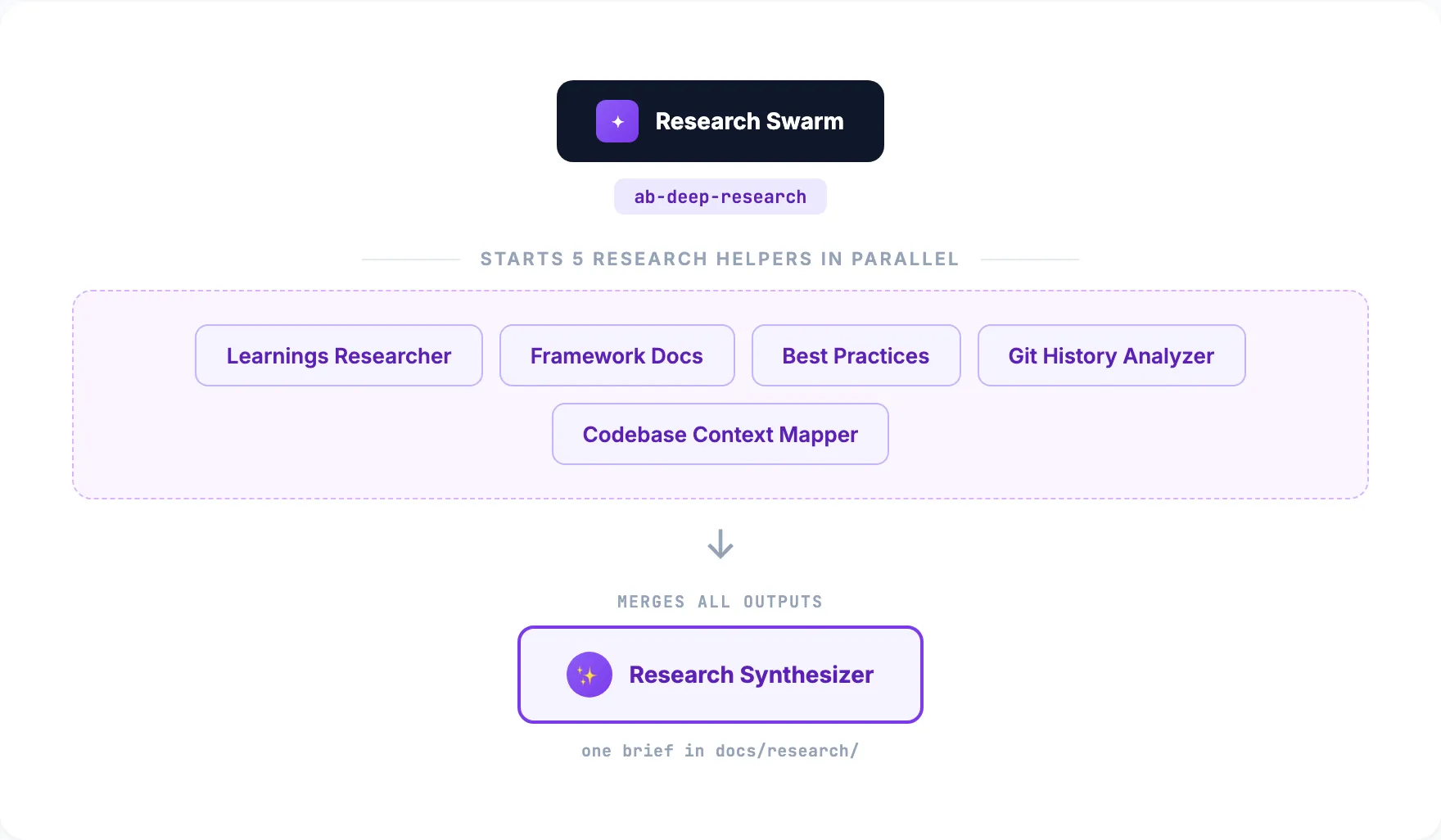
Five helpers research a topic in parallel before planning: past learnings, framework docs for the installed versions, industry practice, git history, and a map of the code the change touches. A synthesizer turns their findings into one brief.
Swarms or team work
| Pattern | Best for | How it works |
|---|---|---|
Swarms (ab-review-swarm, ab-deep-research) |
Analysis: the same input through different lenses | Read-only helpers; a synthesizer merges the outputs |
Team work (ab-orchestrate) |
Implementing a plan’s tasks | Task ledger, waves, file ownership or worktrees, lead-only commits |
A typical feature combines them: ab-deep-research, then ab-brainstorming, then ab-orchestrate, then ab-review-swarm.
How helpers run
A helper runs in its own context where the tool can start one; otherwise the main session follows the prompt file itself. Each prompt opens with a role header (what it may change, whether it is safe at lower effort, and that it starts no helpers of its own) and ends with an Output section, so both paths return the same shape.
Single dispatch, one helper for one job:
Main session -> helper with references/agents/security-sentinel.md -> findings -> act on resultsSwarm dispatch, several helpers on the same input with different lenses:
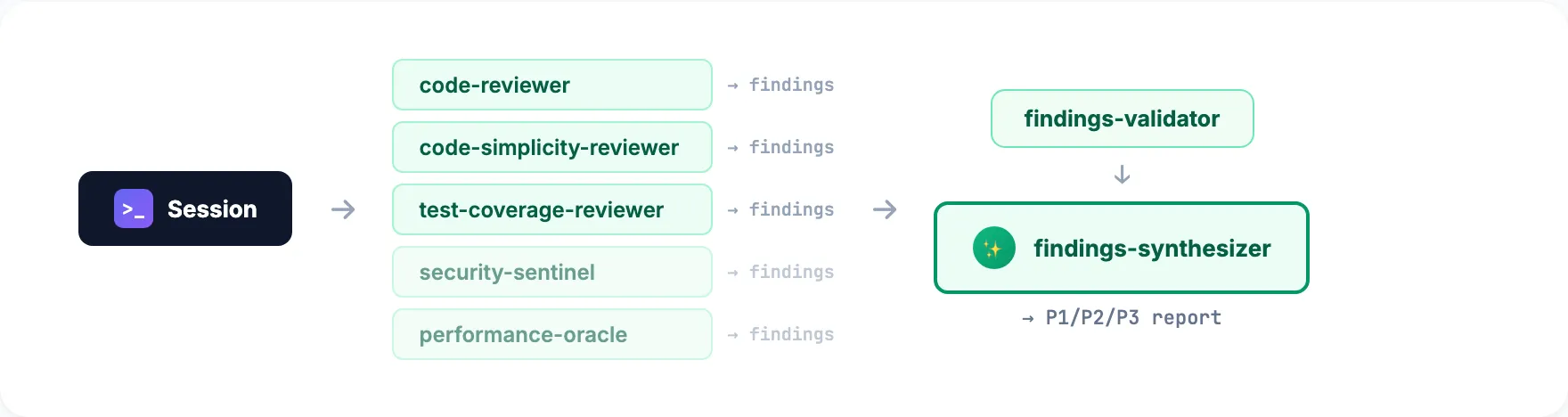
Wave dispatch, parallel within a wave and sequential between waves:

Team dispatch, with a native team feature switched on: long-lived teammates with file ownership and messaging, on top of the ledger:
Skills in this guide
- Pipelines
ab-orchestrate
Runs a plan as team work: ledger, dependency-ordered waves, file ownership or worktrees, lead-only commits, review and sign-off
Use when: Four or more tasks, some independent
- Quality
ab-review-swarm
Specialized reviewers in parallel, findings validated and merged into one P1/P2/P3 report
Use when: Significant changes
- Design
ab-deep-research
Researches a topic with five helpers in parallel and writes one synthesized brief
Use when: Before planning something unfamiliar
- Design
ab-brainstorming
Turns an idea into an approved design: settles what the repository answers, challenges the premise, compares two or three approaches, saves the plan. Never asks twice for a design you approved
Use when: Before any new feature